ClinicalTrials.gov reports when a study record changes. The service is free, it works, and it takes a minute to set up. What it does not report is what changed. Learning that means either opening the record's history and comparing two versions by hand, or using a tool that does the comparison. This guide covers both.
A "change" here is any edit the sponsor submits that the registry publishes as a new version of the record. It shows up as a new "Last Update Posted" date.
What the registry provides for free
The RSS feed. Every search on ClinicalTrials.gov can be turned into a feed. With the date filter on, the feed lists the records in that search that were updated in the last 14 days, refreshed once a day. A search for a single NCT number becomes a feed for one trial. Each entry carries the title, conditions, interventions, sponsors and current status. What it does not carry is the change itself. A trial that pushed its completion date back a year looks exactly like one that fixed a typo.
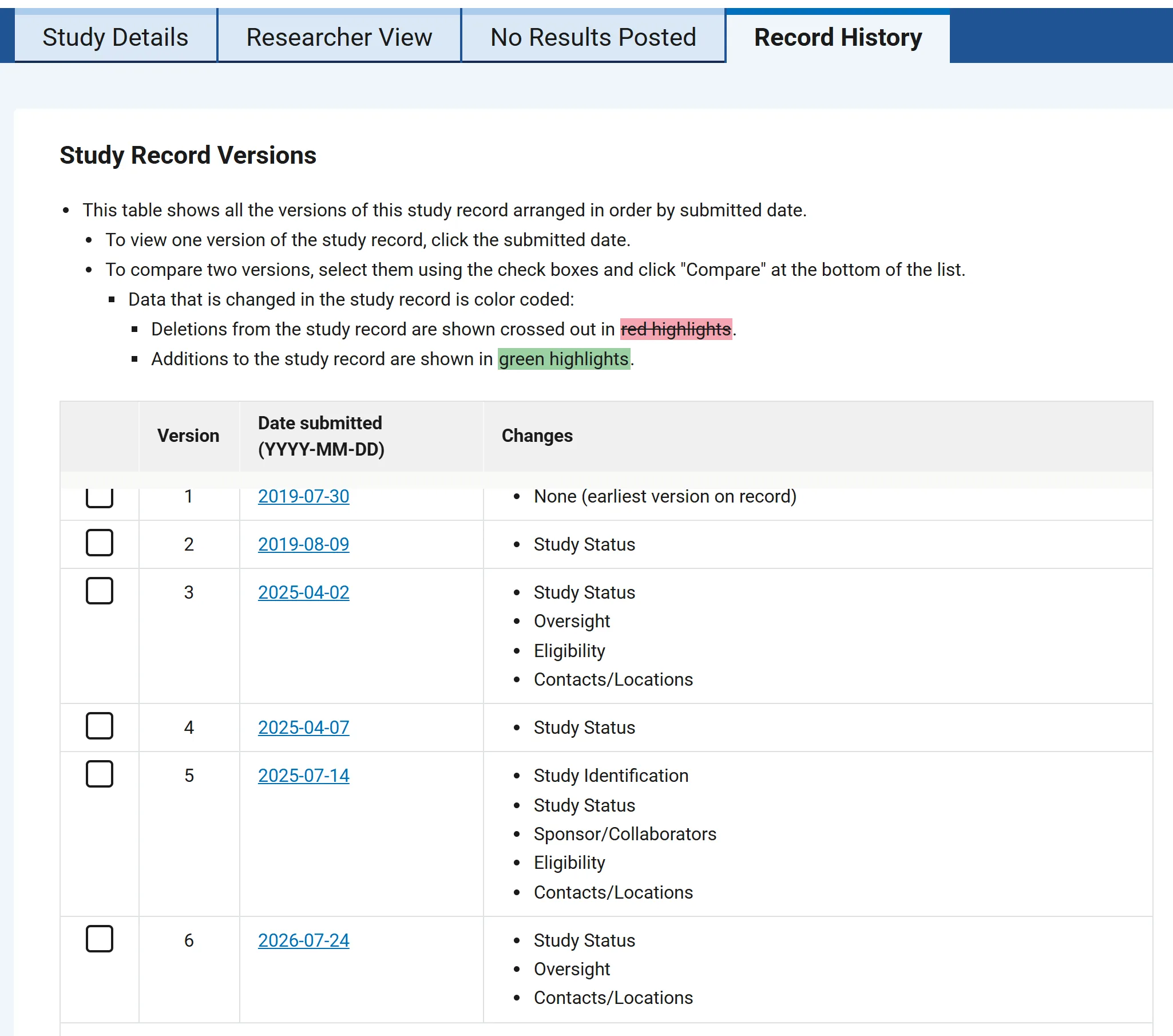
The Record History tab. Every study page has one. It lists each version by the date it was submitted and names the sections that changed, such as Study Status or Contacts/Locations. Tick two versions, click Compare, and the older one appears with deletions struck out in red and additions in green. It is complete. It is also manual, and nobody does it for a long list every morning.
The same change, seen two ways
A real example. NCT04041713 is a Phase 2 pilot study in Rett syndrome. Its Record History shows version 6, submitted July 24, 2026, with changes in Study Status, Oversight and Contacts/Locations (registry record). That is all the list says. The field is in the comparison view, for anyone who opens it.
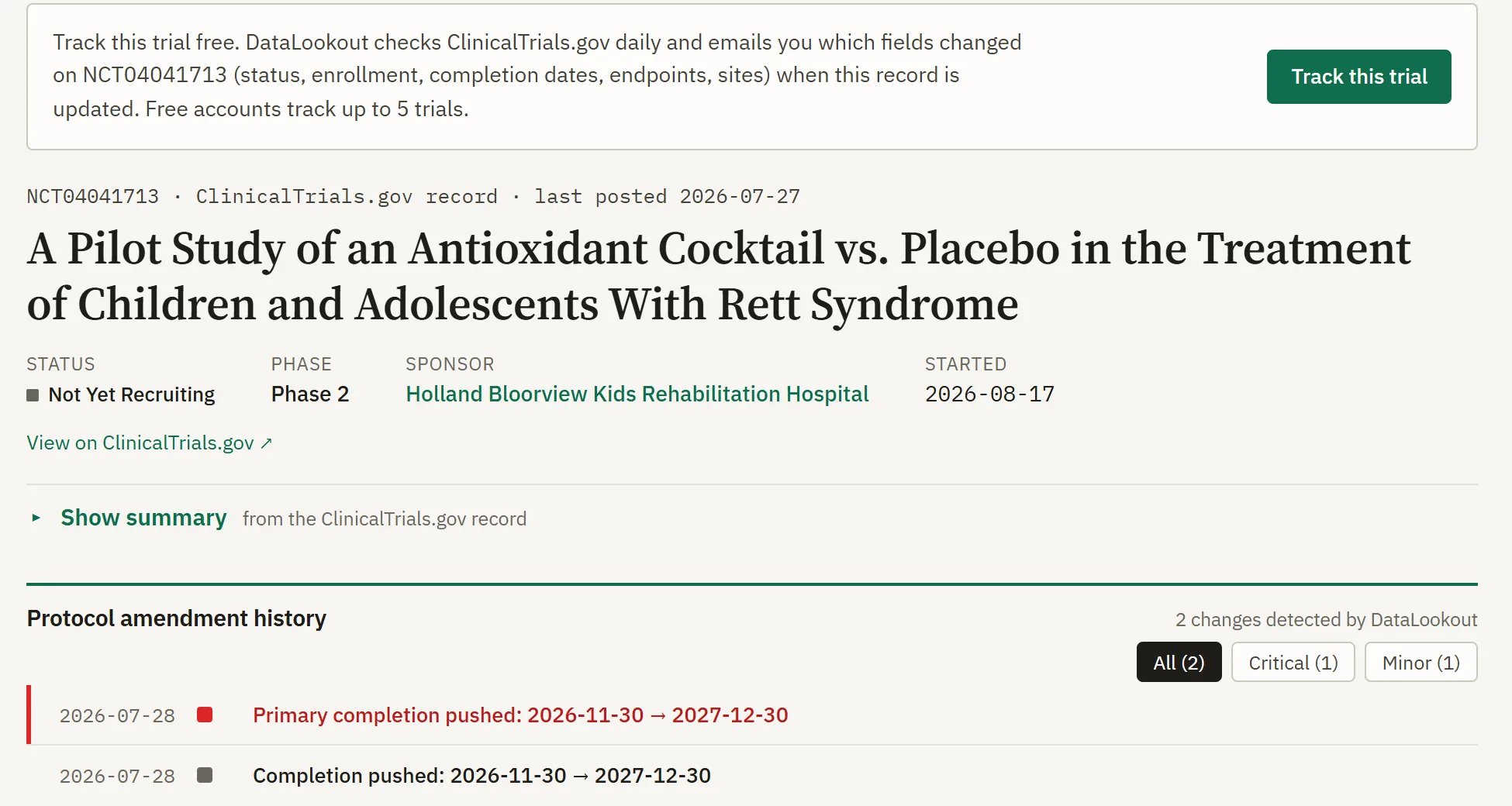
The same record on DataLookout. The primary completion date moved from November 30, 2026 to December 30, 2027. Thirteen months, flagged as critical. (The start date and the study completion date moved with it.) That line is what arrives in the inbox, on every plan.
What actually changes, and how often
DataLookout keeps a copy of every record it monitors and compares each tracked field against the previous day's copy. Over four weeks this summer, across 124,600 monitored trials, 6,467 changed at least one of those fields. Roughly one trial in twenty.
| Field | Changes in four weeks | Per 1,000 trials | |
|---|---|---|---|
| Overall status | 3,514 | 28.2 | |
| Study completion date | 3,060 | 24.6 | |
| Primary completion date | 2,983 | 23.9 | |
| Target enrollment | 1,037 | 8.3 | |
| Number of sites | 1,019 | 8.2 | |
| Primary endpoints | 468 | 3.8 | |
| Why the trial stopped | 217 | 1.7 | |
| Number of arms | 168 | 1.3 | |
| Lead sponsor | 111 | 0.9 | |
| Phase | 98 | 0.8 |
Changes DataLookout detected over the four weeks to 29 August 2026. Registry-wide batch events are left out; the exact window and rules are in the note at the end.
Detection switched on for further kinds of change at the end of August, too recently for a four-week rate. They are listed here with the date each started and what it has produced since, so the counts are not read against the table above:
| Field | Detection began | Changes since |
|---|---|---|
| Results first posted | 28 Aug 2026 | 25 |
| Interventions | 28 Aug 2026 | 24 |
| Completion date confirmed (estimated becomes actual) | 29 Aug 2026 | 55 |
| Final enrollment confirmed | 29 Aug 2026 | 29 |
| Study start date, and the trial actually starting | 31 Aug 2026 | 0 |
One and two days of data. These say nothing yet about how often these fields change, and will be given a rate at the next quarterly refresh.
The direction is the part worth remembering. When a completion date moves, three times out of four it moves later. Enrollment targets go the other way: cut more often than raised.
The most common status change is good news, a trial opening for recruitment. The one that most alerts exist for, a recruiting trial going straight to terminated, happened 75 times in those four weeks.
Which option fits which job
| The job | Registry RSS feed | Record History tab | DataLookout |
|---|---|---|---|
| Know a record was touched | Yes, daily | Yes, on visit | Yes, daily |
| Know which field moved, old and new value | No | Yes, by reading the comparison | Yes, on the page and in every email |
| Watch a whole sponsor or disease portfolio | One feed per search | One page per trial | One watchlist, one daily or weekly email |
| Know how serious the change is | No | No | Critical, notable or minor, by field and size of move |
| Separate registry sweeps from sponsor edits | No | By inspection | By the field and value that changed |
| Cost | Free | Free | Free for 5 tracked trials; $49 a month for 25 |
The first two columns describe ClinicalTrials.gov as of August 2026. The third is DataLookout's current plans.
Which one to use
For one or two trials, where opening the history page whenever the feed fires is no burden, the feed is the right tool. It is free and it works. Once the list is longer than anyone can open by hand, or the question is "did the completion date move, and by how much" rather than "was it touched", that is what DataLookout is for. It reads each record every day and reports which field moved, with the old and new values in the email.
A free account tracks 5 trials plus one sponsor and one disease watchlist. Starter is $49 a month for 25 trials and 3 watchlists of each kind. Pro is $149 a month with no limits. Every plan gets the same daily check and the same email detail; the paid plans add capacity, not depth.
Questions people ask next
Does ClinicalTrials.gov send email alerts when a study changes?
Not by email. ClinicalTrials.gov publishes an RSS feed for any search, including a search for a single NCT number, listing the records whose last update was posted in the previous 14 days. The feed refreshes daily. Each entry gives the study, its conditions, interventions, sponsors and status. It does not say which part of the record changed.
How to see what changed in a ClinicalTrials.gov record
Open the record's Record History tab. It lists every version by the date it was submitted, names the sections that changed (Study Status or Contacts/Locations, for example), and allows two versions to be selected and compared with deletions and additions highlighted. Finding the specific field means reading the comparison.
Which fields on a ClinicalTrials.gov record change most often?
Over the four weeks to 29 August 2026, across 124,600 monitored trials, the three fields that changed most were overall status (3,514 changes, not counting registry-wide batch events), study completion date (3,060) and primary completion date (2,983). Of the ten with a full window, phase changed least (98). When a completion date moved, it moved later about three times in four.
Track a trial, free
Open any trial page on DataLookout and press "Track this trial". DataLookout checks ClinicalTrials.gov every day and sends an email when any of the thirteen tracked fields changes, and when an estimated date or enrollment figure is confirmed as actual.
Start freeExternal sources cited: ClinicalTrials.gov RSS feed for a single study (ClinicalTrials.gov, checked August 22, 2026); Record History for NCT04041713 (ClinicalTrials.gov, checked August 22, 2026); definition of the Unknown recruitment status (ClinicalTrials.gov glossary, checked August 22, 2026).